
It’s no secret that the tech billionaires are trying to convince people to trade their DDR4 PCs for DDR5. Thanks to everyone chasing the artificial intelligence hype, memory components such as RAM and graphics cards are sporadically changing prices between the two- and four-figure range. The companies that are providing these parts are noticing that not everyone is willing to upgrade for financial reasons.
PC builders and computer manufacturers have been experimenting with how to preserve their DDR4 machines so they can meet modern standards in the past few years. And beginners like myself have wondered how far they can run before becoming completely obsolete. The answer may surprise you if you plan wisely.
The Semi-Trash DDR4 Build
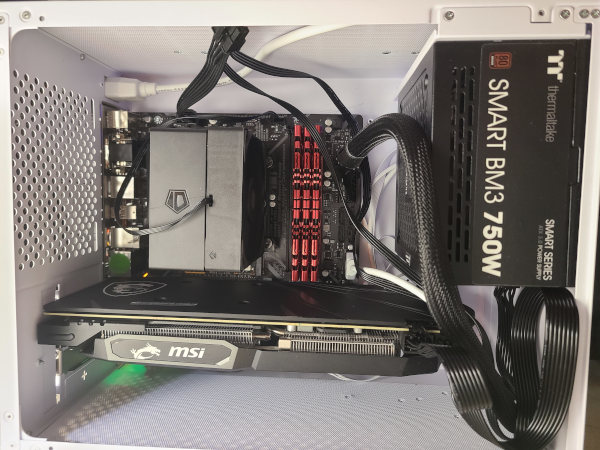
Whether it’s gaming or having a functional work computer, a DDR4 PC can go a long way, even in 2026. The Memory Crisis has pushed consumers to explore the E-waste market. Some people have gotten lucky in finding parts that are within their budget. Others get creative by seeing which computer parts they could reuse for their PC build. My desktop ended up with a mix of used, refurbished, and new parts.
The DDR4 combo I went for is an Intel i5 9th Gen CPU paired with an AMD RX 5600 XT. Both components are compatible with Windows 11 and meet most of the minimum graphics requirements for present-day games and workloads. I chose the i5-9600K for stable performance, supporting up to 128 GB of DDR4 RAM. As for the graphics card, the RX 5600 XT provides 6GB of DDR6 RAM, consumes 150 watts, and can fit in both Micro-ATX and ATX PC cases.
These were originally intended for a 1080p monitor setup. Unfortunately, the monitor I won from an eBay auction was delivered with a fractured screen. I resorted to reusing the family PC’s monitor, the HP S1931a. This 2011 monitor uses DVI and VGA inputs that can be hooked to a modern computer with an HDMI converter. I do get a 6.4% CPU bottleneck because the monitor’s max resolution stands at 1366×768. The HP 1931a is identified as a high-definition screen, which both the i5-9600K and the RX 5600 XT can handle fine.
The only new parts I needed were the CPU cooler, the WiFi PCIE card, and the computer case. My motherboard pick is the H370M D3H GSM, did not come with an integrated wireless internet chip. And the CPU cooler needed to be an LGA1151 4-pin fan. Both components are risky to purchase used due to containing hidden malfunctions. As for the computer case, I purchased a portable Micro-ATX case for easy carrying.
RAM and SSDs are surprisingly the easiest components to find since most of their listings are promoted by scalpers and trusted PC stores. The Memory Crisis has influenced merchants to price-gouge consumers beyond the true worth of memory speeds and storage space.
The latest tech reports have indicated that 2027 is going to be the worst year for PC manufacturers as they search for cheaper memory. Valve has openly discussed this issue when it came to building the Steam Machine during the situation. I settled on 24 GB of 2400 MHz RAM and 512 GB of PC storage. For the mouse and keyboard, they were donated to me for free.
A Dependable Desktop for Game Performance
DDR5 does have its advantages over DDR4 when it comes to graphics architecture, faster loading speeds, and powerful performance. However, GPU manufacturer Nvidia is aiming to encourage gamers to invest in their RTX 5000 cards for the poorly-utilized DLSS5. Instead of promising advanced graphics, the AI is programmed to replace nearly every 3d assets with live-generated visuals.
This budget build could be the one for you if you prefer high-performance over detailed graphics. At 768p HD resolution, games can surprisingly run well on low to medium settings. Capcom’s Pragmata and Onimusha: The Way of the Sword are two of the next-gen titles that can adapt to lower-end computers thanks to their friendly optimization settings.

The RX 5600 XT’s VRAM can process low and medium settings well, keeping gameplay steady at above 60 FPS. Pragamatai impressed me by automatically setting my Upscaling setting to AMD FSR 1, which is the oldest version of AMD’s super resolution firmware that can be applied to any of their graphics card. By balancing the graphics settings, I ran into no issues running the game compared to my run on the AMD Ryzen 3500U.
Onimusha: The Way of the Sword suggested using upscaling on Balanced graphics settings with AMD FSR 3.1.4. The PC managed to keep up with the fast-paced combat. The visuals appeared to have adapted to the monitor’s resolution quite nicely, for there was no frame or graphic tearing.

Games that are built on Unreal Engine 5 showed some strange results. Starting with Marvel Rivals, gameplay will vary on Balanced and Performance settings. While online matches show no issues, large maps and Times Square gatherings are the enemy. I experienced some frame drops due to my 2400 MHz RAM speed. I tried turning off the High Resolution pack on Steam, allowed the settings to scan my system for better optimization, and even put everything on Low graphics settings. There was little change.
According to the player base, Marvel Rivals has been poorly optimized since its 2025 release. Fans have dedicated their time to installing FPS packs to keep their frame rate steady. These updates come over time for each new season. Fans with DDR4 computers have been begging developer NetEase to have the game tested for proper optimization for those who can’t afford DDR5.

And this issue has become more apparent as developers are adopting Unreal Engine 5’s AI capabilities. Even when they are not in use, the studios that use the program to build their games fail to benchmark game limitations. Tango Gameworks ‘ Hi-Fi Rush is a prime example of using the game engine properly, as they saw opportunities for creative purposes without stressing players’ resources and their wallets.
Was It Worth It to Build a DDR4 Machine?
After a week of testing, I am proud to say that I have enjoyed the PC building experience to learn about cause and effect as the Memory Crisis continues on. Seeing that a beginner like me could make my own desktop work as long as I am resourceful. And because many of the parts are purchased used, I only spent over $400.
| Components | Price (Excluding Shipping) |
| i5-9600K | $27.50 |
| RX 5600 XT | $118 |
| G.Skill Ripjaws 4 2400MHz (3-Pack) | $50 |
| Thermaltake Smart BM3 Bronze 750W | $45 |
| Thermaltake Cable Kit | $25 |
| Micron 512GB SSD NVME M.2 | $60 |
| ID-Cooling SE-903-XT V2 | $15 |
| AX210 WiFi 6E Card | $25 |
| 3-Prong Power Cord (2-Pack) | $12 |
| Gamer X Micro-ATX Case | $40 |
| Gigabyte H370M D3H GSM | $48 |
| DVI-D Male to HDMI Female Adapter | $4 |
| GPU Bracket | $4 |
Some of these prices may have changed as AI hyperscalers continue to hoard memory from their consumers. The best part is that this PC is capable of handling work programs that consume lots of memory, especially for those who are looking forward to becoming content creators. Until we see hopeful news from the tech industry, DDR4 is here to stay while DDR5 appears to be out of reach.
